

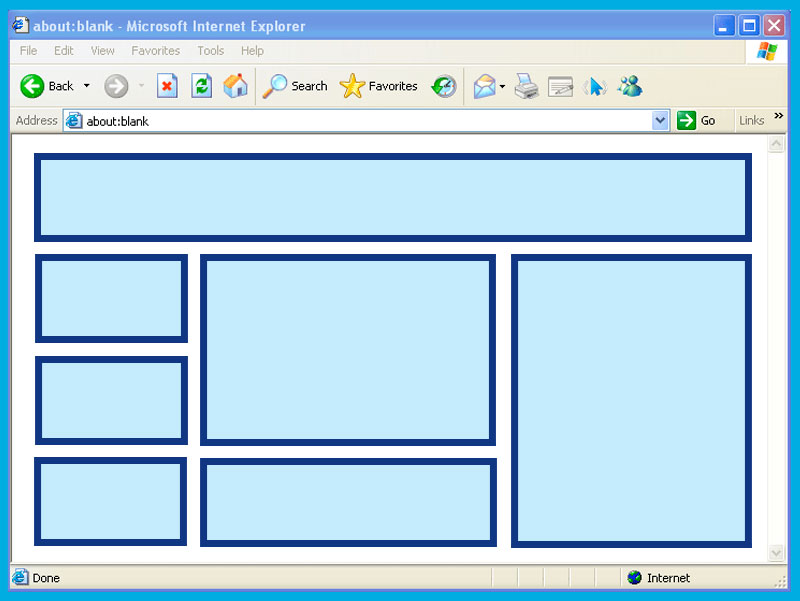
Ah, the humble HTML table. Once the crown jewel of web design, now a relic that makes modern developers roll their eyes and mutter, “Not this again.”
For those who lived through the early internet days, tables were everything.
They weren’t just for organizing data—they were the web designer’s duct tape, scaffolding, and blank canvas. Nested tables? Oh, that’s where the magic (or madness) happened.
Grab your coffee (or therapy cat); we’re diving into the wild world of tables.
A Brief History: When Tables Ruled the Web
Back in the ’90s, CSS wasn’t the stylish, responsive powerhouse it is today. Instead, web designers had one tool to bring order to the chaos of the web: tables. Need a multi-column layout? Use a table. Want pixel-perfect alignment? Add a table inside a table! Fancy a header bar? That’s right, table time.
Developers built sites like Russian nesting dolls, stuffing tables within tables within tables. It was a symphony of Sure, your HTML ended up looking like the blueprint for an IKEA bookshelf, but it worked! Mostly. Sometimes. Until you had to debug it. Ah, nested tables—a concept so notorious, it might as well come with a warning label: “Abandon hope, all ye who enter here.” Let’s say you had a simple layout idea. Easy, right? But by the time you finished nesting tables for your header, sidebar, footer, and “fun, animated GIF section,” your HTML looked like it had been possessed by a rogue AI. Forget styling; you needed a PhD in archaeology just to locate that one rogue Modern devs with their fancy flexbox and grid don’t know the struggles. Nested tables were the original escape rooms of web design. If you could debug a deeply nested table layout in under an hour, you deserved a medal—or at least a drink. Now let’s talk aesthetics. Table borders were an art form. Should you go for solid or dashed? One pixel or three? Fancy double borders? Oh, the possibilities were endless. Of course, if you wanted something truly avant-garde, you’d color each cell differently. Sure, it made your website look like a clown threw up on it, but boy, was it bold. Pro tip from 1998: if your table wasn’t working, just add The arrival of CSS was a bittersweet moment for tables. Suddenly, tables weren’t needed for layout anymore. They were unceremoniously dumped into the “data-only” corner of HTML. Flexbox and Grid swept onto the scene like rockstars, making layout design intuitive and responsive. But tables weren’t bitter. Oh no. They just quietly sat in the corner, waiting for the next poorly designed email template to drag them back into the spotlight. Don’t call it a comeback—they never left. Sure, they’re not the layout workhorse they once were, but tables are still essential for displaying data. Try using flexbox for a spreadsheet. Go ahead, we’ll wait. Tables know their worth. And nested tables? They’re like the eccentric uncle at a family reunion—rarely seen, deeply confusing, and the source of stories that will haunt you forever. Tables may not be trendy, but they’re reliable. They’ve been there for us, through Geocities and beyond. They’ve taught us patience, problem-solving, and how to cry quietly at 2 a.m. while fixing a broken layout. So, let’s pour one out for the humble table. You were the unsung hero of early web design, and for that, we’ll always respect you. Just… maybe stay away from nesting, okay?
From graphic designer oversights and unprompted rebrands to conspiracy theories and racial overtones, we’ve seen a lot of weird, wacky, and downright disastrous logos in recent times. In this ranking,
Responsive grids were supposed to save us. Once upon a time, they were the answer to our multi-device nightmares. No more fixed-width layouts! No more weirdly cropped images! Just beautifully fluid de
Remember clicking? That sharp, deliberate action where you made a choice, committed to a path, and opened the next door in the digital house? Yeah—clicking is dead. Or at least dying.Slowly, awkwardly
Within hours of the recent mass shooting at a New Zealand mosque by a far-right terrorist, the country’s authorities were scrambling to ensure a sickening video the murderer streamed on Facebook was b
Pantone has unveiled its Color of the Year for 2025: Mocha Mousse (PANTONE 17-1230), a warm, soft brown that exudes comfort and sophistication.This selection reflects a cultural gravitation towards ha
One of the biggest clashes in design has been the question of whether to strip down your landing page to the point where it’s so minimal that it has no navigation at all. Proponents argue that the onl
Trust occurs when our physical, emotional and logical responses combine into one confident, positive intuitive feeling. When we trust companies or brands, the feeling—or “experience”—is often carefull
When you consider the success stories of the internet age, you could be forgiven for believing that luck has been the deciding factor. Amazon, for example, is a retail company whose launch coincided w ,
, and . Nested Tables: The Russian Doll of Nightmares
that was causing your layout to implode. The Art of Table Borders
border="1". It didn’t solve anything, but at least you could see the chaos you created.Tables vs. CSS: The Great Breakup
Tables Today: The Comeback Kid
In Conclusion: A Love Letter to Tables
You May Like
The 20 Most Controversial Logos of All Time (Ranked)
Rethinking Responsive Grids with a Content-Aware Approach

The Death of the Click: How Scrolling Took Over the Web

Internet Censorship is Here: How Far Will it Go?
Pantone Unveils Color of the Year: Mocha Mousse
Classic landing page mistakes you’re probably still making

Building trust with UX
4 essential elements of successful UX design
Leave a Comment
We'd love to hear your thoughts on this article